The latest models have become extremely good at HTML animations: titles, diagrams, little characters, all written as a web page, with hyperframes or without. I was making mine in Claude Design. It worked, with two catches. Longer animations ran into Chrome’s memory limit. And each one ended up as a video file that I imported into Kdenlive, where it was frozen: changing anything meant going back, exporting again, and replacing the clip.
I wanted one workflow: footage, cuts and animations in the same project, with the result still editable at the end.
So I built kuma-editor (working name), a video editor I share with my coding agent. I cut footage on a normal timeline. Titles, bubbles and animations on top are small web pages. The agent joins the same project over MCP: it edits the timeline, writes overlays, and looks at the rendered frames to check its work. I see every change live and can undo any of them.
I ask, the agent builds, the agent looks, I decide.
It’s a two-week-old proof of concept, Linux only. Here are the four decisions that shaped it, and the bugs that taught me the most.

The shape of it
A Rust daemon owns the project; the editor UI and the agent are both thin clients of it. The agent’s MCP server is a small proxy to the daemon, so when the editor is open, I watch the agent’s edits land. Preview frames come from a small C++ sidecar running MLT, the engine behind Kdenlive and Shotcut. Export compiles the project to MLT XML for melt, after hyperframes has baked every overlay to transparent PNGs in headless Chromium.
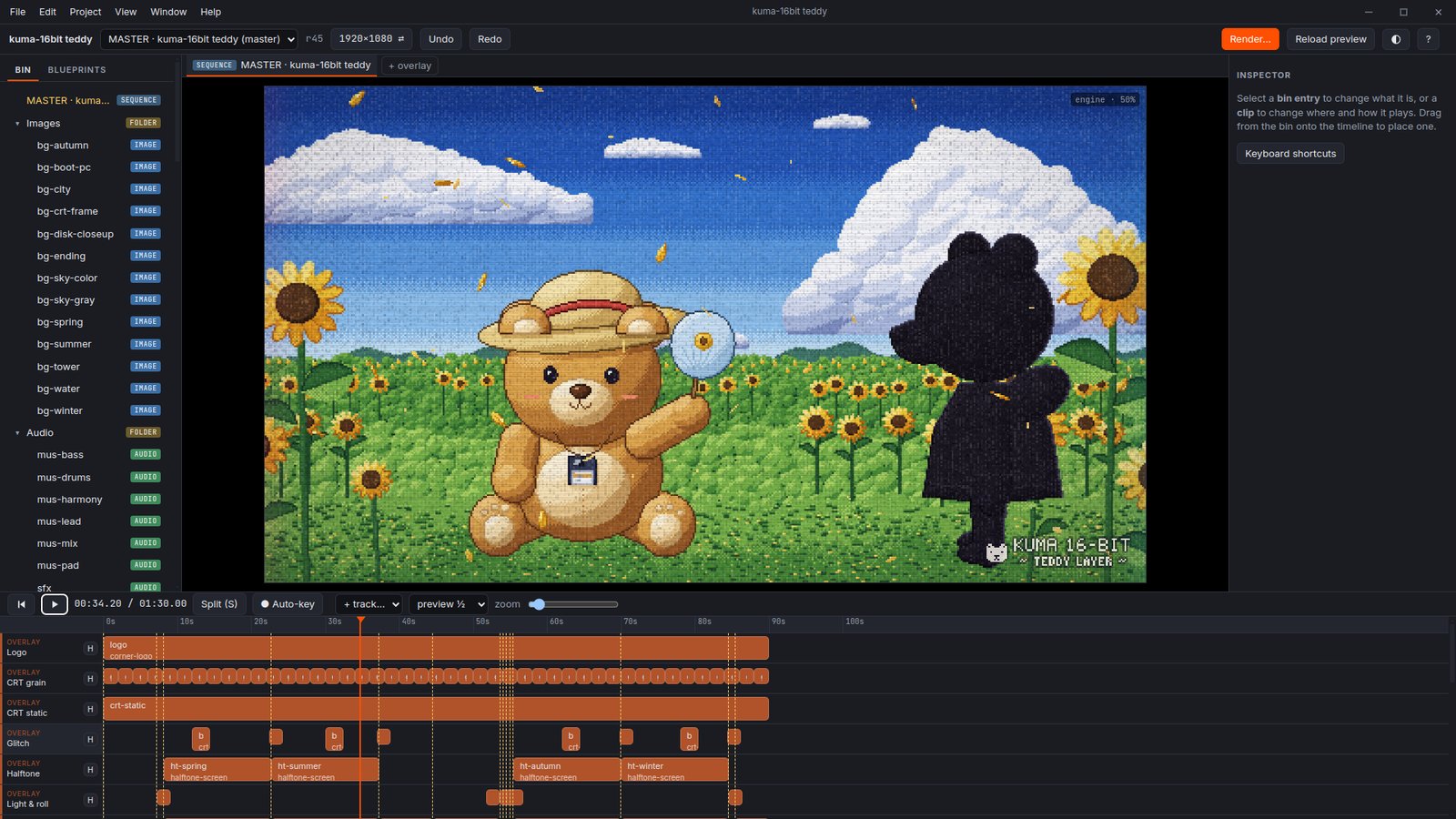
Kuma 16-bit in the editor. Every orange block on the timeline is an overlay.
1. One JSON file, not MLT XML
MLT XML is a bad format for a language model to edit: inclusive frame indices next to durations, one visible track stored as two, a flat graph of id references where one edit touches several distant places. So the source of truth is a compact JSON document in seconds, where a clip is only a placement. One Rust compiler turns it into MLT XML; it’s the only code that knows MLT’s rules, and seconds become frames in exactly one function.
The daemon is written in Rust, mostly because it’s fast and safe. A bonus: when I add a new kind of clip or effect, the compiler lists every place that doesn’t handle it yet.
2. Every edit is a JSON Patch with a revision
The agent and I edit the same file at the same time. Every change, mine or its own, is one JSON Patch that applies completely or not at all, and is one step in the shared undo history:
{
  "base_revision": 42,
  "note": "a warmer greeting",
  "patch": [
    {
      "op": "replace",
      "path": "/bin/hello/source/vars/text",
      "value": "Good evening!"
    }
  ]
}
base_revision matters most. An agent can think for a minute between reading and editing; if I moved a clip meanwhile, its edit is refused with a 409 and it re-reads. Nothing I did gets overwritten.
Stale edits are refused, never merged blindly.
The rule has a downside for long jobs. Transcribing speech takes minutes. The job used to read the project when it started, and send its edit at the end, based on that old revision. If I changed anything in between, even just renaming a clip, the edit was refused and the whole transcript was lost. Now the job waits until the transcript is ready, then builds its edit from the current project and applies it right away, leaving no gap for another edit to slip in.
3. Overlays are web pages
MLT can cut and cross-fade, but not a hand-drawn bubble that pops in with a little overshoot. The web can, and it’s what agents write best. An overlay is a folder with an index.html, a GSAP timeline kuma can seek to any frame, and an overlay.json that the inspector turns into form fields. While I edit, it runs live over the preview; at export, the same HTML is baked frame by frame.
Every mark here is an overlay.
That only works if the page renders identically in both places, which decided a lot:
- Electron, not Tauri. Tauri is ~20× smaller, but on Linux it previews in WebKit while the bake runs in Chromium.
- One worker per bake. Multi-worker capture gave different frames on GSAP transforms. Separate one-worker processes were byte-identical over 12 runs, so clips bake in parallel instead (4× faster).
- Seeded
Math.random, fonts as files. A bake is a pure function of its inputs, which also makes it cacheable.
4. The agent has to look
An agent that writes a title and says “done” has checked nothing. The key tool is sample_frames: it renders exact frames through the real export pipeline and hands them to the agent as images, cropped or tiled into a captioned contact sheet. Sampling an overlay that isn’t placed yet builds a throwaway project, because looking at something should never cost a revision or an undo step.
The agent’s tools, as a party menu.
Feedback is given with markers on the timeline, each holding a note, and every marked moment is sampled by the agent. The review routine in the skill file shipped with every project ends with: look at the frames.
Bugs that look like working software
A stale preview looks exactly like a preview. The worst bugs were invisible:
- Overlays played at five-sixths speed. Bakes were read back at ffmpeg’s default 25 fps in a 30 fps project. The live preview was right, and the test overlay was a box that doesn’t move.
- Blend modes did nothing. The test checked the generated string, not the pixels.
- The UI guessed when to reload the preview, and two of three versions of that guess shipped wrong. Now the daemon hashes the compiled project and reloads when it changes, which made byte-for-byte compiler determinism a tested requirement.
So the tests that matter compare pixels, frame hashes and loudness, not strings.
Agents as field testers
The best testing was agents making real videos through MCP alone, then reporting what hurt: a seamless loop, a 9½-minute explainer about kuma made in kuma, and a 90-second music video by six agents in one project, remaking the ending of 16bit Sensation: Another Layer. Most of today’s tools came out of those reports.

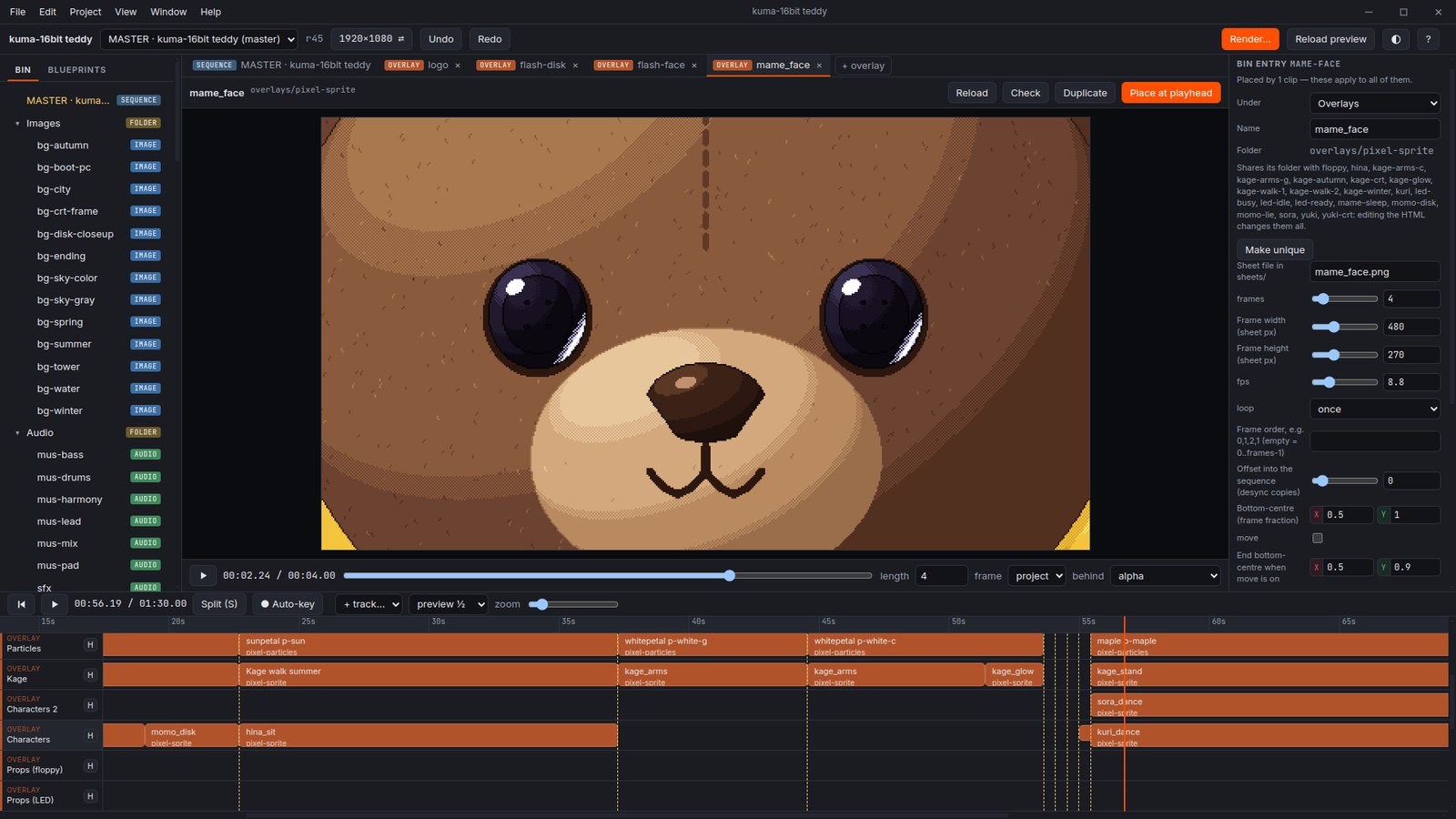
One sprite overlay from Kuma 16-bit, its settings generated from its overlay.json.
What’s next
I’ll keep working on it, adding features as I make content for MyAnimeTrip. Right now, it’s the ultimate slop machine, so the next step is an even stronger human-agent loop, one that makes the most of both.
And it still needs a real name: applications are open, send me yours.