My HyperX SoloCast 2 sounded off on Ubuntu, a bit harsh on loud words. My voice didn’t come through as well as on my small wireless mic. After poking around, I discovered the mic has settings that could help, but the only way to change them is NGENUITY, HyperX’s configuration software, and it’s Windows-only. So on Linux I had a mic I couldn’t fully use, and the fix was to build a small tool to configure it from Ubuntu myself: no copy of NGENUITY, just enough to talk to the hardware.
It was also a good excuse to try REA, a reverse-engineering toolkit for agents. I put the NGENUITY installer and REA in a folder, opened Claude Code, and asked for help. From there, Claude (Opus 5.5) did the reverse engineering. I mostly watched, granted permissions, and talked into the mic when asked.
From the installer to the bytes
Claude started from the mic itself. Over USB, the SoloCast 2 is a standard audio device, which is why gain and mute already worked on Linux. It also exposes a vendor HID interface, so that’s where the extra settings had to be.
Then it unpacked the installer. NGENUITY is a .NET UI plus a background service written in Rust that talks to the devices. The UI code listed what the SoloCast 2 can do: high-pass and low-pass filters, and a presence boost from −6 to +6 dB. For the bytes themselves, Claude found a shortcut: the installer also ships a macOS build of the Rust service that kept its function names, so functions like set_onboard_eq_configuration could be disassembled and read directly.
REA itself needed a full build, so Claude used lighter Python libraries for the analysis (dnfile, lief, capstone). In the end, the whole protocol fits in two messages:
60 01 00 00 00 FF       filters: bit 0 = high-pass, bit 1 = low-pass
66 01 01 00 00 00 G T   presence boost: G = sign | whole dB, T = tenths
Nothing was written to the mic before it was understood: read-only queries first, then each setting toggled, read back, and restored. Only then did Claude write a Python CLI, a GTK 4 / libadwaita GUI, and a udev rule so my user can access the mic without root.
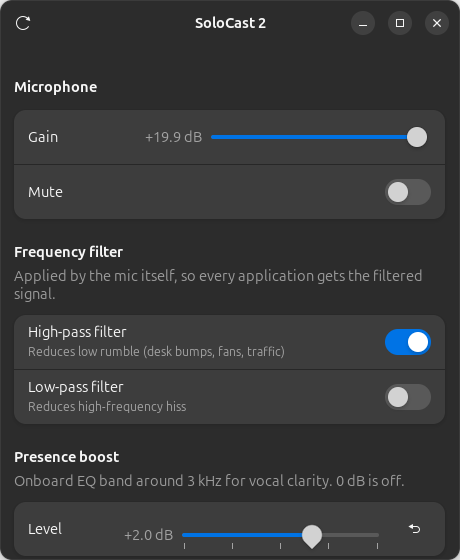
The GUI: native GNOME look, no dependencies beyond what Ubuntu ships.
What the mic was actually doing
Measuring along the way also explained the strange sound. The gain sat at its maximum and the mic was clipping on loud words: the tops of the waveform were cut flat. Lowering it to +4 dB fixed that. And NGENUITY’s noise suppression turned out to be host software (a Windows audio engine and a virtual mic), not a mic feature, so on Linux that job goes to EasyEffects.
Now I can configure the mic from Ubuntu, filters, presence boost, gain and mute included, and the tool is open source under the MIT license: solocast2-linux.